
AI SRE Chat, organisational memory, source code correlation, and Grafana - shipped.
Every investigation OpsWorker has ever run for your team has taught us something. Until now, that knowledge reset after each incident. Your platform team knew which services were brittle and why. Your runbooks captured hard-won lessons. But the AI investigating the next alert started from scratch.
OpsWorker 1.5 changes that. This release ships three things that compound in value the longer you use the platform: memory that persists across investigations, a conversational interface that talks to your cluster directly, and source code correlation that connects what broke with what changed.
Memory: OpsWorker Now Knows Your Environment
The most significant change in 1.5 is not a feature you will see in a single investigation. It is something you will feel over weeks and months as OpsWorker stops asking questions you have already answered.
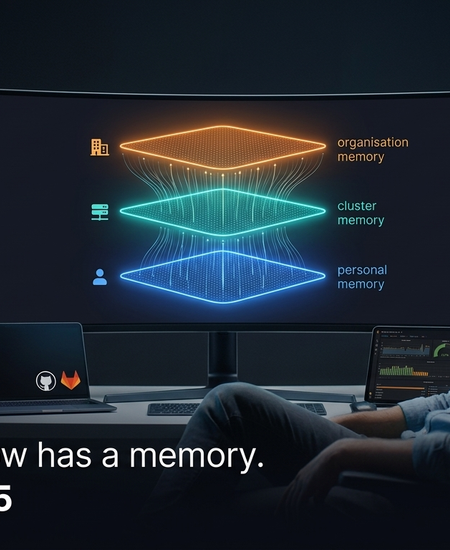
Memory in 1.5 operates at three levels:
- Personal memory - every user has their own persistent profile. OpsWorker understands how you work, what your preferences are, and what context you have provided in past sessions. You can view, edit, and add instructions directly. The AI applies your preferences automatically in chat and investigations.
- Cluster memory - facts about specific clusters persist across investigations. Teach OpsWorker that your payment service depends on a third-party webhook ingress, or that a particular namespace has known noisy alerts, and it applies that knowledge every time it investigates that cluster.
- Organisation memory - standards, rules, and operational knowledge that apply across all clusters in your organisation. Runbook patterns, deployment conventions, service ownership - anything your team has established that should inform every investigation.
Investigation agents have read-only access to memory - keeping automated investigations consistent and predictable. Chat agents can write to memory - so conversations with your cluster actually make the platform smarter over time.
The value compounds. The longer OpsWorker runs in your environment, the more it reflects your team's specific knowledge - not generic Kubernetes patterns.
AI SRE Chat: Talk to Your Cluster
Automated investigation handles the 3am alert before you open a terminal. But some questions don't come from alerts. Why is this service behaving differently in staging versus production? What changed in this namespace last week? Walk me through the dependencies of this deployment.
OpsWorker 1.5 ships a full conversational interface for questions like these. Chat connects to the same agents and tools that power automated investigations - so you are not talking to a general-purpose AI. You are talking to an AI that has access to your live cluster, your Grafana, your GitHub, your GitLab, and your organisation's memory.
Key capabilities:
- @mention agents directly - type @grafana or @source-code to route your question to the right specialist. Autocomplete suggests available agents based on your connected integrations.
- Visible reasoning - multi-step investigations show each agent, the tools it calls, and progress in real time. You see how the answer was reached, not just the answer.
- Architecture diagrams inline - when OpsWorker maps service dependencies or traces failure paths, diagrams render directly in the chat as Mermaid visualisations.
- Cluster-scoped history - conversations are organised by cluster, with full session history, renaming, and grouping.
For VP Engineering and CTO decision-makers: this is the interface that makes OpsWorker useful beyond incidents. Platform engineers can use it for ad-hoc cluster queries. Junior engineers can ask questions they would previously have escalated. Postmortems can be grounded in actual cluster state rather than reconstructed from memory.
GitHub and GitLab: Connect Alerts to Code Changes
The question every on-call engineer asks first: did something change? In most environments, answering that question means switching to GitHub, checking recent deployments, cross-referencing commit times with alert timestamps, and hoping the deployment description is accurate enough to be useful.
OpsWorker 1.5 connects your source repositories directly to the investigation pipeline. When an alert fires, the Source Code Explorer agent automatically looks for correlated changes - recent commits, deployments, configuration updates - and surfaces them alongside the root cause analysis.
- GitHub integration with connection testing and installed-integration preview. Your repositories are available to both automated investigations and chat sessions.
- GitLab integration via OAuth with Dynamic Client Registration (DCR) and PKCE - works with both api.gitlab.com and GitLab MCP endpoints.
- Source Code Explorer agent investigates relevant repository changes and can work without Kubernetes context for pure code-level questions.
The practical result: instead of "high error rate on checkout service," your Slack notification now includes "correlates with deployment v2.3.1 pushed 14 minutes ago, which updated the payment processing library." The gap between detection and diagnosis narrows significantly.
Grafana MCP Integration: Metrics in Context
OpsWorker has always worked with your existing monitoring stack. Version 1.5 deepens that by bringing Grafana directly into investigations and chat sessions.
The integration uses dynamic capability detection - OpsWorker only loads the agents and tools your specific Grafana instance exposes. Tool calls in chat show Grafana integration badges so you can see exactly when and why Grafana data was pulled into an answer.
Also in 1.5
Daily Alert Digest. A cluster-scoped daily summary of alerts and investigations, available in the portal with a date picker for historical review. Platform Infrastructure Signals surfaces cluster-level issues. Namespace filtering keeps the digest focused on production traffic.
Slack notifications per namespace. Route incident investigations to the right team channel based on Kubernetes namespace. Map clusters and namespaces to specific Slack channels from the portal. Namespace context is included in every notification payload.
Demo mode. New prospects can explore OpsWorker with realistic data without connecting their environment. Built-in usage limits make it safe for evaluation.
What This Means
OpsWorker started as an automated investigation layer - alerts in, root cause out, under 2 minutes, no human trigger. That foundation is intact and continues to improve.
Version 1.5 begins the transition to something broader: a platform that accumulates knowledge about your environment, connects your toolchain into a single operational interface, and gets more accurate the longer it runs. Investigations become more targeted because the platform knows your clusters. Chat sessions become more useful because the platform knows your team. Source correlation becomes automatic because the platform knows your repositories.
The goal has always been the same: give engineers the answer before they open a terminal. 1.5 is a significant step toward making that answer reflect everything your organisation already knows.
OpsWorker 1.5 is available now.
14-day free trial: app.opsworker.ai | Book a demo: calendly.com/opsworker/discover-opsworker
Subscribe to our email newsletter and unlock access to members-only content and exclusive updates.
Comments