OpsWorker
ProductCustomers
Resources
Company
Sign upBook a Demo
Europe's First AI SRE Platform

Your AI SRE
Production Intelligence

Resolve production incidents and development issues with AI that understands your code, infrastructure, and telemetry - reducing MTTR by up to 80% and boosting engineering productivity by 50%.
Book a DemoStart free Trial
SOC2 Compliant
14-day free trial
opsworker-demo
Incident Resolved
Terminal
Explore the AI SRE Platform
EasyDmarc
Picsart
GrowCycle

Trusted by Engineers building the FUTURE

Real production stories from teams using OpsWorker to investigate incidents faster, reduce MTTR, and eliminate operational toil.

Konstantin Lalafaryan
Incident Response
Konstantin Lalafaryan
CHIEF INFORMATION OFFICER(CIO)
Read case study
Picsart
Picsart

"Modern cloud platforms generate enormous amounts of operational data, but the real challenge is turning those signals into improvements. OpsWorker helped us convert operational findings directly into code-level fixes, allowing our teams to continuously strengthen the platform."

90% alert reduction
80% alerts -> actions
60% less manual fixes
30% cost savings
View all customer stories

Meet the AI production Intelligence center

From alert to resolution, give your team everything they need to respond quickly, reduce downtime, and keep customers in the loop.

Incident Resolution Agent
Solve Incident 4x Faster
Correlates telemetry, infrastructure changes, and code context to identify root causes and propose resolutions within minutes.
On-Call Engineers
For: SREs, DevOps, On-Call Engineers
Prevention Agent
Preventive Reliability Guard
Identifies reliability risks before they reach production and recommends improvements - automatically generating PRs for fixes.
Engineer Managers
Software, DevOps, SRE Engineer
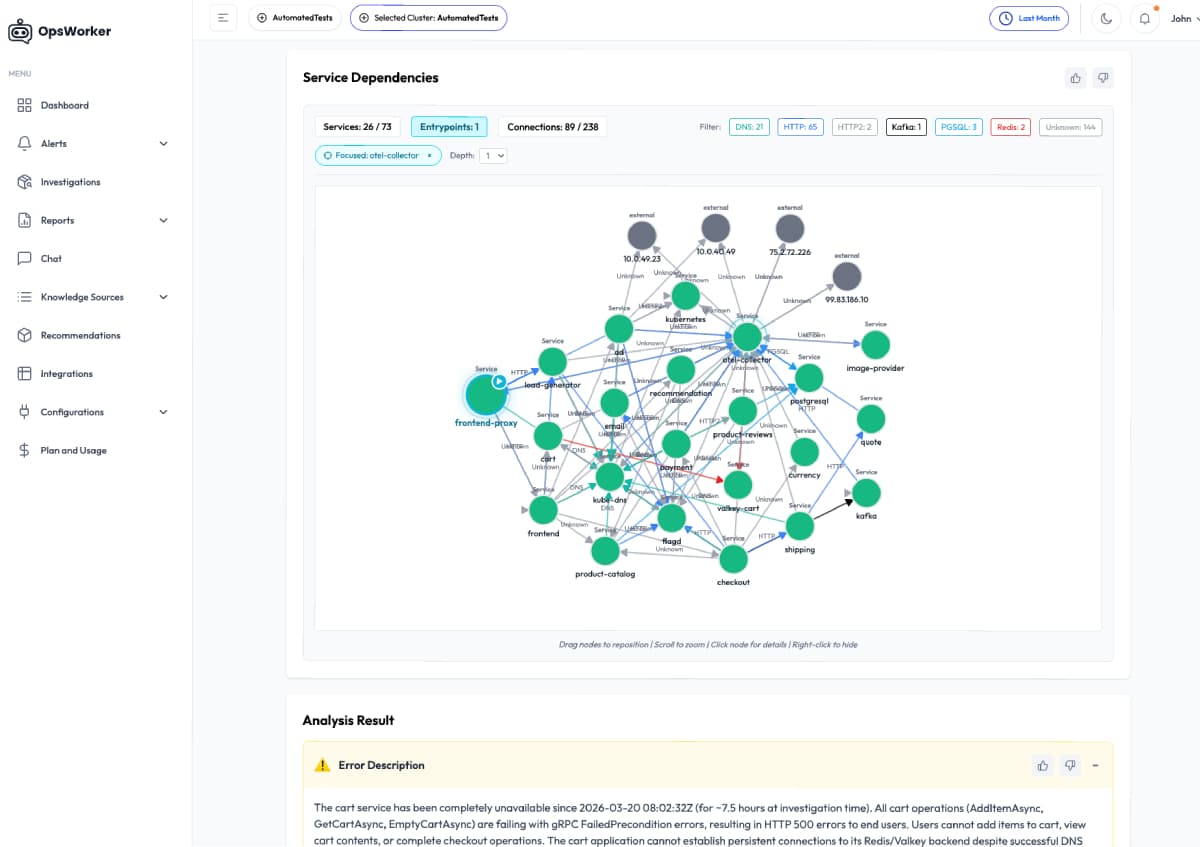
Service Discovery Agent
System Visibility
Analyzes service topology, traffic flows, and runtime connections to reveal hidden dependencies and quickly pinpoint the service causing the incident.
Engineers
Software, DevOps, Platform Engineers
Production Intelligence Agent
Production Real-time Brain
Builds a living model of your production system - including infrastructure topology, deployment patterns, failure modes, and service ownership.
Company Leaders
All Engineers and Business Leaders
Data
Code
OpsWorker AI
Signals
Knowledge
The Central Brain for Your Infrastructure
OpsWorker ingests data, analyzes patterns, and automates resolutions in a continuous loop.
1
Observability
Collect the singles from your telemetry and changes from different Observability sources.
2
AI Analysis
AI correlates signals, topology, code and configuration data to identify the true root cause.
3
Resolution
Propose immediate actions to resolve the incident, Auto-generates PRs for fixes, escalates to Slack with context.

Accelerate Incident resolution for On-Call teams,decrease toil & prevent issues before they hit production.

On-Call Engineers
SRE
Reduce MTTR without scaling the team
Get investigation results and L1-L3 remediation steps in minutes-without jumping between dashboards or manually correlating events.
Instant Root Cause Identification using multi-agent AI fit
Actionable remediation steps with suggested commands
Clear Blast Radius Visibility and Domain Identification (infra, network, DNS, app)
Get investigation results in Slack
Refine troubleshooting with additional facts in dedicated incident chat
MTTR
On-call load
Incident Escalations
Cross-team handoffs
Receive alerts and trigger investigation

Receive alerts & trigger investigation

Software Engineer
SRE
Prevent issues before they reach production
Detect reliability risks early and continuously improve system stability with auto-generated PRs by identifying misconfigurations, weak deployment patterns, and operational risks before they cause incidents.
Catch gaps and risky changes before they fail in prod
Receive proactive recommendations to improve service reliability
Auto-generate PRs for preventive and improvement fixes
Track release digests instead of babysitting post-release stability or monitor issues during SDLC
Turn incidents into improvements that prevent future failures
Incident Prevented
Change Failure Rate
Production Incidents
Reactive Firefighting
Preventive measures

Preventive measures before incidents occur

Software Engineer
SRE
Your AI teammate for System Visibility
Automatically discover dependencies between Kubernetes resources and upstream/downstream services to give teams clear visibility into service interactions and failure propagation.
Auto discovery of service and objects dependencies
Visualize upstream and downstream service
Instantly identify the service causing cascading failures
Understand the blast radius of failures across the system
MTTR
Mean Time to Identify Impact
Cross-team Coordination
Pre-production Issues Detected
All services discovered

All services automatically discovered

Engineering Leaders
Build a living memory of your production system
OpsWorker builds a living model of your production systems by correlating telemetry, infrastructure state, deployments, and business signals – turning operational data into continuously improving reliability insights.
Build a continuously evolving model of your systems
Correlate telemetry, infrastructure state, and business signals
Understand how technical events impact revenue, funnels, and conversions
Query production knowledge beyond individual expertise
Improve investigations with accumulated operational context
Time to Identify Biz Impact
Investigation Accuracy
False Incident Efforts
Business Impact Visibility
Chat with running infrastructure

Chat with your running infrastructure, code or telemetry

Your 24/7 AI SRE Agentic PLATFORM

Empower Your Engineers with AI SRE Platform

An AI SRE platform built for modern cloud-native environments, automating incident investigation by correlating signals across telemetry, code, and infrastructure to help engineering teams run reliable production systems.

Accelerate Troubleshooting & Root-Cause Analysis
Reduce your incident MTTR
Resolve incidents faster with AI-driven incident management that correlates telemetry, code changes, configurations, metrics, and infrastructure anomalies-delivering accurate root-cause analysis without guesswork.
Faster Incident Resolution: Surface the true root cause in minutes instead of hours.
Answers You Can Trust: Multi-agent validation across telemetry, topology & code eliminates hallucinations.
Fewer Recurring Failures: Data-driven recommendations to prevent repeat incidents and improve reliability.
Reduce Operational Load
Automate repetitive operational work with AI SRE agents that identify patterns across incidents and system behavior-so your Engineering teams focus on building instead of firefighting.
Boosts Developer Productivity by 20%+
Frees Up Engineering Time from L1-L2
Build Reliability from the First Deployment
Alerts
AI Analysis
Automated Fix
Production Intelligence Engine
OpsWorker continuously improves investigation accuracy by learning from incidents, user feedback, and real production behavior-adapting to system changes and evolving environments.
Improves Investigation Accuracy Over Time
Adapts to Changing Infrastructure
Learns from Team Interactions
AILearningEngine
IncidentsIncidents & Signals
InvestigationAI Investigation
ResolutionResolution & Fixes
FeedbackTeam Feedback
Secure by design
Built with a zero-trust architecture, end-to-end encryption, and hardened infrastructure-giving teams the flexibility to run OpsWorker securely in their own environment.
Seamless ecosystem integration
Integrate securely with your observability, CI/CD, and cloud infrastructure tools.
End-to-End Encryption & Zero-Trust Architecture
All telemetry, investigation data, and communications are protected by strict access controls and encrypted pipelines.
Flexible Deployment Options
Run OpsWorker in your own private-cloud infrastructure or connect via AWS Private link for high security and complacency enterprise
Zero Trust
E2E Encryption
Self-Hosted
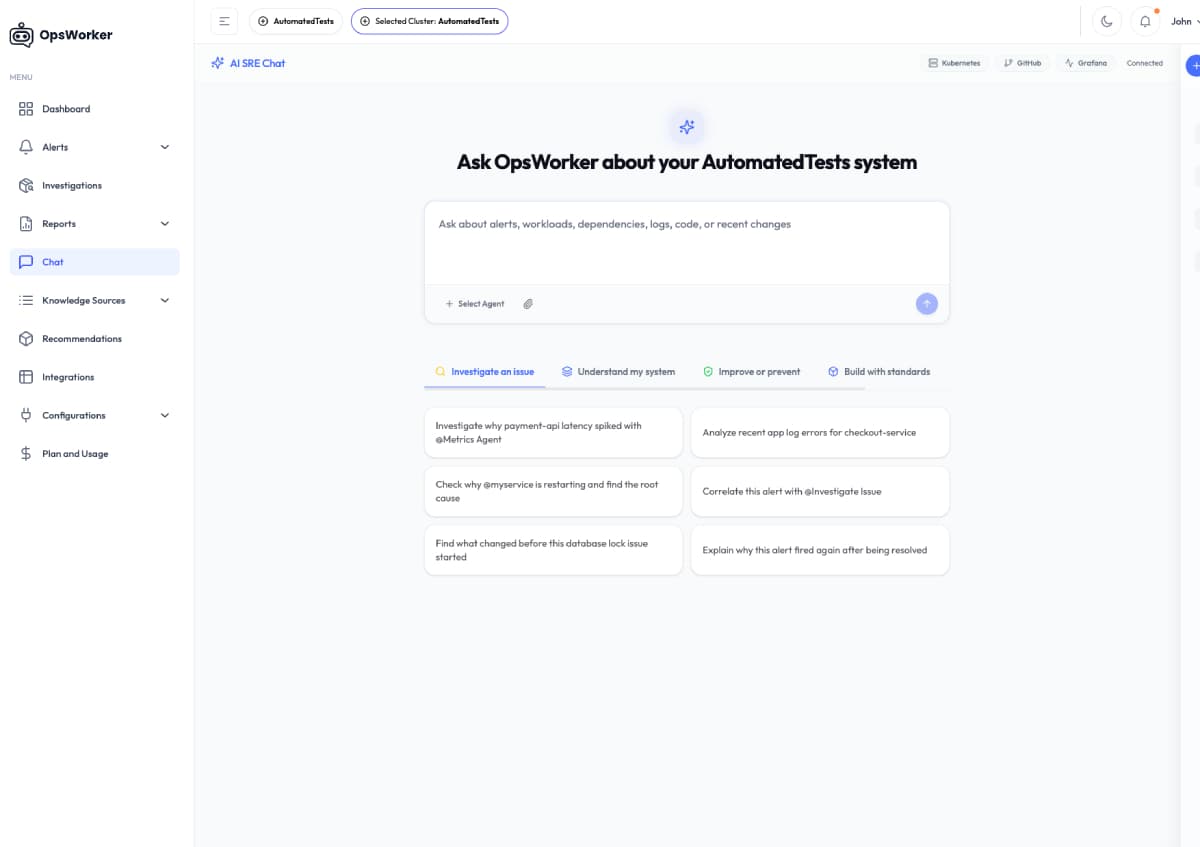
Self-service troubleshooting
Investigate issues instantly using AI-powered troubleshooting directly in Chat. OpsWorker analyzes live telemetry, infrastructure context, and recent changes to deliver actionable insights-while allowing teams to add additional agents connected to their own data sources for deeper investigation.
Immediate answers, no waiting on DevOps
Self-service Troubleshooting in Chat
Extend Investigations with Your Data
Guidance Based on Live System Conditions
#ops-support
FAQ
Frequently Asked Questions
General
What is an AI SRE?
An AI SRE is software that does what a Site Reliability Engineer does during an incident: gather context, correlate signals, identify the root cause, and recommend a fix. The difference is speed. A human SRE takes 30-80 minutes to investigate an alert. An AI SRE does it in under 2 minutes. Not because it's smarter, but because it doesn't context-switch, doesn't need to remember which Grafana dashboard to check, and doesn't get paged at 3 AM after four hours of sleep.
General
What are the leading AI SRE tools for EU?
Several tools address AI-driven incident investigation, and the field is growing quickly. OpsWorker is purpose-built with EU teams in mind. It runs fully within EU AWS regions, so your investigation data never crosses regional boundaries. For teams with stricter compliance requirements, OpsWorker also offers a private-cloud deployment model — the full platform can be brought into your own infrastructure, whether that's AWS, Azure, GCP, or an on-premise Kubernetes environment. You own the data, the compute, and the pipeline. No third-party AI providers involved.
General
How is OpsWorker different from other AI SRE tools?
Three things. First, OpsWorker is Kubernetes-native. It understands pods, services, deployments, ingresses, and how they connect to each other. Second, it works with your existing stack. Prometheus, CloudWatch, Datadog, Slack, GitHub. No migration, no rip-and-replace. Third, it shows its work. Every investigation produces a full trace of what was checked, what was found, and why the conclusion was reached. You can ask follow-up questions in real-time chat, drill into individual evidence, and provide section-level feedback on the analysis. No black boxes.
How It Works
How does AI SRE find the root cause of incidents?
OpsWorker runs a multi-agent investigation pipeline with five specialized AI agents. When an alert fires, the extraction agent parses alert metadata. The topology agent discovers affected Kubernetes resources by crawling the resource graph (pod to service to deployment to ingress) and validates wiring between them (selectors, labels, ports). The dependency agent maps service dependencies. The investigation agent gathers live runtime data: logs, events, configurations, resource metrics. The analysis agent synthesizes everything into a root cause with specific remediation commands.
How It Works
Can an AI SRE fix incidents automatically?
OpsWorker provides specific, copy-paste remediation commands (kubectl commands, configuration changes, resource adjustments) but does not execute them automatically. This is a deliberate design choice. Automated remediation sounds great on a conference stage. In production, it means trusting an AI to modify your running infrastructure without human review. OpsWorker gives you the fix in seconds. You decide when to apply it.
How It Works
How quickly can AI SRE resolve incidents?
From alert received to root cause analysis complete: under 2 minutes. That includes topology discovery, wiring validation, log collection across all affected pods, event correlation, and LLM analysis. For context, the industry average for manual investigation is 30-80 minutes. Most of that time is spent gathering context, not thinking. OpsWorker eliminates the gathering.
Features
What can I do with the Slack integration?
Three things. First, investigation notifications: when an alert fires, OpsWorker posts an Investigating message to your Slack channel, then updates it with the full root cause analysis, findings, and remediation steps when the investigation completes. Second, feedback collection: you can rate investigations directly from Slack using emoji reactions, inline buttons (Accurate / Partially Accurate / Needs Improvement), or a detailed feedback modal. Third, the daily alert summary. Everything happens in threads, so your channel stays clean.
Features
What is the free-form chat?
Free-form chat is a conversational AI interface for your Kubernetes cluster, independent of any specific investigation. You can ask it anything: show me pods in the payments namespace, why is this service slow, investigate the pod that keeps restarting in staging. It supports multi-turn conversations with persistent history, has access to your cluster via the same secure agent, and dynamically loads tools from all your connected integrations (GitHub, Slack, Kubernetes). Think of it as an SRE copilot that knows your cluster.
Features
Can I ask follow-up questions about an investigation?
Yes. Every investigation has a built-in chat interface. You can ask questions like why a memory issue was ruled out or request logs from another pod in the service and get real-time responses. The chat has full context of the investigation findings and can run additional live queries against your cluster to answer your questions. You can also restart an investigation with additional context if you have information that wasn't available to the initial analysis.
Features
Can I provide feedback on investigation quality?
Multiple ways. From Slack: emoji reactions for quick thumbs-up, buttons for categorization (Accurate / Partially Accurate / Needs Improvement), or a detailed feedback modal. From the portal: section-level feedback on individual parts of the analysis (root cause accuracy, remediation quality, evidence completeness). This feedback helps OpsWorker's team continuously improve investigation quality.
On-Call
How does AI SRE reduce alert fatigue?
Alert fatigue isn't about getting too many alerts. It's about spending 30 minutes investigating an alert only to find it was a transient blip. OpsWorker investigates every alert the moment it fires, so by the time an engineer looks at it, the root cause analysis is already there. The daily summary gives you a morning overview of what happened overnight without checking dashboards. The alert that took 40 minutes to triage now takes 30 seconds to review. Engineers stop ignoring alerts when the investigation is already done for them.
On-Call
Does OpsWorker replace on-call engineers?
No. OpsWorker replaces the most tedious part of on-call: the investigation. The 3 AM page still happens. But instead of spending 45 minutes context-switching between dashboards, logs, and kubectl commands while half-asleep, the on-call engineer opens the Slack notification or the portal and sees exactly what went wrong, which resources are affected, and what to do about it. They can ask follow-up questions in chat if they need more detail. The engineer still makes the call. They just make it in minutes instead of an hour.
Integrations
What integrations does OpsWorker support?
Alert sources: Prometheus AlertManager, AWS CloudWatch, Datadog. Notification: Slack (investigation results, feedback collection, daily summaries). Code context: GitHub (commits, PRs, code correlation via GitHub App). Kubernetes: lightweight read-only in-cluster agent via Helm chart, communicating over SQS. All integrations are managed per-cluster from the portal, with test/simulate functionality to verify connectivity before going live.
Integrations
Does OpsWorker work with my existing monitoring stack?
Yes. OpsWorker is designed as an add-on, not a replacement. It ingests alerts from your existing monitoring tools via webhook. It doesn't replace your dashboards, your alerting rules, or your runbooks. It adds an AI investigation layer on top of what you already have. Your Prometheus setup stays exactly the same. You just point a webhook at OpsWorker.
Integrations
How does OpsWorker connect to my Kubernetes cluster?
OpsWorker uses a lightweight, read-only agent deployed inside your cluster. The agent operates with least-privilege access — it can observe cluster state but cannot make any changes to your workloads or configuration. All communication between the agent and OpsWorker's backend is outbound-only, so there is no inbound network exposure to your cluster. The deployment process is straightforward and does not require changes to your existing infrastructure or monitoring setup.
Security & Data
Is my cluster data safe?
Security is a core design principle, not an afterthought. The in-cluster agent is read-only and cannot modify your workloads. Investigation data is processed with strict tenant isolation — no data is shared across organizations. Access to the portal is protected by industry-standard authentication with role-based access control. For teams that require full data sovereignty, OpsWorker supports private-cloud deployments where the entire platform runs inside your own infrastructure.
Getting Started
How long does it take to set up OpsWorker?
About 15 minutes per cluster. The portal walks you through a step-by-step setup wizard: register your cluster, deploy the Helm chart, configure your alert source webhook, connect Slack. There's a built-in test that sends a simulated alert through the entire pipeline to verify everything works before you go live. No code changes, no agent installation on individual nodes, no changes to your existing monitoring configuration.
Getting Started
What size team is OpsWorker built for?
OpsWorker is built for engineering teams of 10-50 engineers with 3-10 people in SRE or DevOps roles, handling 20-200+ alerts per week. That's the sweet spot where alert volume is high enough to cause real pain but the team isn't large enough to throw bodies at the problem. The platform supports multi-organization and multi-cluster setups, so it scales with your infrastructure.
Getting Started
Can I try OpsWorker before committing?
Yes. OpsWorker offers a trial period where you can connect a cluster and see investigation results on real alerts. The onboarding wizard includes a simulated alert test so you can see the full investigation pipeline in action within minutes of signing up. The best way to evaluate an investigation tool is to see it investigate your actual incidents, not a canned demo.
Accepting Partners
Shape the Future of AI-Driven SRE
Join forward-thinking engineering leaders building autonomous infrastructure. Whether for early access or investment, let's redefine reliability.
System Status
Autonomous
Resolution
Instant
Get in Touch
Connect with our team directly
AREA CODE
+1
  • Afghanistan+93
  • Albania+355
  • Algeria+213
  • Andorra+376
  • Angola+244
  • Antigua and Barbuda+1268
  • Argentina+54
  • Armenia+374
  • Aruba+297
  • Australia+61
  • Austria+43
  • Azerbaijan+994
  • Bahamas+1242
  • Bahrain+973
  • Bangladesh+880
  • Barbados+1246
  • Belarus+375
  • Belgium+32
  • Belize+501
  • Benin+229
  • Bhutan+975
  • Bolivia+591
  • Bosnia and Herzegovina+387
  • Botswana+267
  • Brazil+55
  • British Indian Ocean Territory+246
  • Brunei+673
  • Bulgaria+359
  • Burkina Faso+226
  • Burundi+257
  • Cambodia+855
  • Cameroon+237
  • Canada+1
  • Cape Verde+238
  • Caribbean Netherlands+599
  • Cayman Islands+1
  • Central African Republic+236
  • Chad+235
  • Chile+56
  • China+86
  • Colombia+57
  • Comoros+269
  • Congo+243
  • Congo+242
  • Costa Rica+506
  • Côte d'Ivoire+225
  • Croatia+385
  • Cuba+53
  • Curaçao+599
  • Cyprus+357
  • Czech Republic+420
  • Denmark+45
  • Djibouti+253
  • Dominica+1767
  • Dominican Republic+1
  • Ecuador+593
  • Egypt+20
  • El Salvador+503
  • Equatorial Guinea+240
  • Eritrea+291
  • Estonia+372
  • Ethiopia+251
  • Faroe Islands+298
  • Fiji+679
  • Finland+358
  • France+33
  • French Guiana+594
  • French Polynesia+689
  • Gabon+241
  • Gambia+220
  • Georgia+995
  • Germany+49
  • Ghana+233
  • Gibraltar+350
  • Greece+30
  • Greenland+299
  • Grenada+1473
  • Guadeloupe+590
  • Guam+1671
  • Guatemala+502
  • Guinea+224
  • Guinea-Bissau+245
  • Guyana+592
  • Haiti+509
  • Honduras+504
  • Hong Kong+852
  • Hungary+36
  • Iceland+354
  • India+91
  • Indonesia+62
  • Iran+98
  • Iraq+964
  • Ireland+353
  • Israel+972
  • Italy+39
  • Jamaica+1876
  • Japan+81
  • Jordan+962
  • Kazakhstan+7
  • Kenya+254
  • Kiribati+686
  • Kosovo+383
  • Kuwait+965
  • Kyrgyzstan+996
  • Laos+856
  • Latvia+371
  • Lebanon+961
  • Lesotho+266
  • Liberia+231
  • Libya+218
  • Liechtenstein+423
  • Lithuania+370
  • Luxembourg+352
  • Macau+853
  • Macedonia+389
  • Madagascar+261
  • Malawi+265
  • Malaysia+60
  • Maldives+960
  • Mali+223
  • Malta+356
  • Marshall Islands+692
  • Martinique+596
  • Mauritania+222
  • Mauritius+230
  • Mayotte+262
  • Mexico+52
  • Micronesia+691
  • Moldova+373
  • Monaco+377
  • Mongolia+976
  • Montenegro+382
  • Morocco+212
  • Mozambique+258
  • Myanmar+95
  • Namibia+264
  • Nauru+674
  • Nepal+977
  • Netherlands+31
  • New Caledonia+687
  • New Zealand+64
  • Nicaragua+505
  • Niger+227
  • Nigeria+234
  • North Korea+850
  • Norway+47
  • Oman+968
  • Pakistan+92
  • Palau+680
  • Palestine+970
  • Panama+507
  • Papua New Guinea+675
  • Paraguay+595
  • Peru+51
  • Philippines+63
  • Poland+48
  • Portugal+351
  • Puerto Rico+1
  • Qatar+974
  • Réunion+262
  • Romania+40
  • Russia+7
  • Rwanda+250
  • Saint Kitts and Nevis+1869
  • Saint Lucia+1758
  • Saint Pierre & Miquelon+508
  • Saint Vincent and the Grenadines+1784
  • Samoa+685
  • San Marino+378
  • São Tomé and Príncipe+239
  • Saudi Arabia+966
  • Senegal+221
  • Serbia+381
  • Seychelles+248
  • Sierra Leone+232
  • Singapore+65
  • Slovakia+421
  • Slovenia+386
  • Solomon Islands+677
  • Somalia+252
  • South Africa+27
  • South Korea+82
  • South Sudan+211
  • Spain+34
  • Sri Lanka+94
  • Sudan+249
  • Suriname+597
  • Swaziland+268
  • Sweden+46
  • Switzerland+41
  • Syria+963
  • Taiwan+886
  • Tajikistan+992
  • Tanzania+255
  • Thailand+66
  • Timor-Leste+670
  • Togo+228
  • Tonga+676
  • Trinidad and Tobago+1868
  • Tunisia+216
  • Turkey+90
  • Turkmenistan+993
  • Tuvalu+688
  • Uganda+256
  • Ukraine+380
  • United Arab Emirates+971
  • United Kingdom+44
  • United States+1
  • Uruguay+598
  • Uzbekistan+998
  • Vanuatu+678
  • Vatican City+39
  • Venezuela+58
  • Vietnam+84
  • Wallis & Futuna+681
  • Yemen+967
  • Zambia+260
  • Zimbabwe+263
Protected by enterprise-grade security.
Company
About UsContact UsSecurityPrivacyTerms
Resources
GlossaryBlogProduct NewsAgentic Ops Weekly
Product Resources
DocsIntegrations
AI Tools
KubectlAI

Automating reliability for modern engineering teams.

Trusted, Enterprise-Level Security to Protect Your Data. OpsWorker's agent doesn't transfer any PII or sensitive data, and allows you to control which data is uploaded.

OpsWorker © 2026. All Rights Reserved