
A founder's honest answer to the question I keep hearing.
Recently, during conversations with customers, I've been getting a version of the same challenge from several engineering leaders.
The question goes something like this: "Why do I need OpsWorker AI SRE if my engineers can connect their IDE via MCP to our internal data sources and query the data directly from their laptops?"
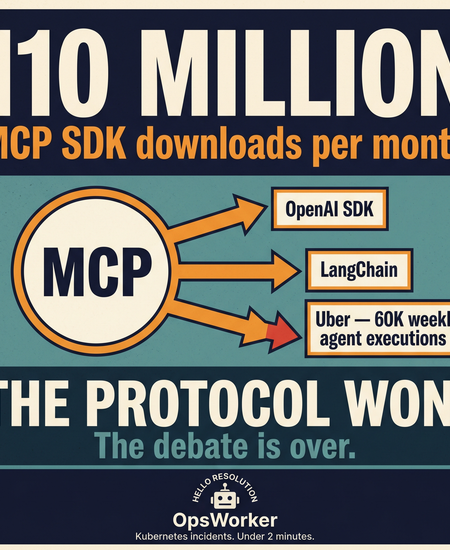
Moreover, MCP just hit 110 million SDK downloads per month.
That number came from the co-creator of the protocol at the MCP Dev Summit in New York this week. OpenAI's agent SDK pulls MCP in as a dependency. So does LangChain. The protocol won. That debate is over.
But the conversation at the summit wasn't about adoption numbers. It was about what happens when you actually run MCP at scale. Uber showed up with 1,500 monthly active agents, 60,000 agent executions per week, and 10,000+ internal services behind an MCP gateway. Amazon described a "lethal trifecta" checklist - private data access, untrusted content exposure, external communication - that every MCP server in their registry gets scanned against before it touches a production agent.
The "will it work?" phase is over. The conversation now is shifting to more practical questions:
- How do you govern it?
- How do you secure it?
- How do you make results consistent?
- How do you turn access into measurable operational outcomes?
That brings us back to the question I hear from engineering leaders.
Let me answer it directly.
First: You're Right That It Works
If your engineers are connecting their IDE to internal data sources via MCP and getting useful answers - that's real progress. They're moving faster. They're not paging the platform team for every data question. That's genuinely valuable.
And if OpsWorker were just a more convenient way to query data - a cleaner interface on top of the same MCP connections - I'd tell you not to buy it. You wouldn't need it.
But that's not what we built. And it's not the problem we're solving.
The Question Behind the Question
When I hear "my engineers can query data via MCP," my first question is always: what are you actually trying to solve?
Because there are two different goals hiding behind that statement, and they call for very different answers.
One is self-serve access to operational data - developers getting answers without filing a ticket or pinging the platform team every time they need to check something. The other is reducing incident response time, eliminating operational toil, and getting consistent answers under pressure at 2am - when the person asking the question is tired, the clock is running, and a wrong answer costs real money.
MCP genuinely helps with the first one - though even there, only partially, to be honest about it. The second one is a much harder problem, and it's the one most teams underestimate until they're in the middle of it.
A Real Incident Example
When an alert fires, the on-call engineer may need to answer:
- Is the latest release related?
- Which service is failing first?
- Is this infra, app, DNS, network, config, or database?
- What changed recently?
- What is the blast radius?
- Which team owns the likely cause?
- Has this happened before?
That usually means pulling data across:
- metrics
- logs
- traces
- deployments
- topology
- ownership
- configs
- past incidents
If the engineer knows exactly what to ask, in what order, and under pressure at 2am, MCP can absolutely help them move faster.
But they still need to drive the investigation.
They still need to assemble the picture.
And during stressful incidents, that human capability becomes variable.
OpsWorker starts the investigation automatically the moment the alert fires—correlating those signals, applying organisational context, and often narrowing the likely causes before the engineer even opens a terminal.
The Hidden Complexity of AI SRE
There's a deeper issue here that I've watched play out with multiple teams who tried to build this themselves.
Production incident investigation looks manageable from the outside. Engineers check dashboards, search logs, review deployments, correlate signals. Experienced engineers do this fast because they've internalized the patterns. The assumption is that connecting an AI to the same data sources will replicate that capability.
It doesn't. Not reliably.
The gap between prototype and production
Internal AI initiatives almost always start with a promising prototype. A knowledge retrieval system. A single-model setup that queries a few tools. A hybrid that combines automation with a database of past incidents. These perform well in demos.
Then they meet real production environments - which evolve constantly through deployments, infrastructure changes, and shifting team ownership. The prototype that worked last month starts giving wrong answers. The team patches it. New edge cases emerge. The patches accumulate. The system becomes fragile in ways that are hard to trace.
Why production AI SRE is harder than it looks
- Dynamic environments: Infrastructure changes frequently. The system model that was accurate last week may be wrong today. Keeping it current is continuous work, not a one-time setup.
- Model evolution: Foundation models change. The prompts you tuned in January behave differently in June. Without robust evaluation, you don't know when quality has degraded.
- Non-repeating failures: Many incidents involve unique conditions that haven't occurred before. A system trained on past incidents has no template for a genuinely novel failure.
- Operational data diversity: Real environments include multiple clouds, legacy systems, and inconsistent telemetry. Normalizing this diversity is itself a significant engineering problem.
What production-ready AI SRE actually requires
Based on building this and watching teams try to build it themselves, a system that works reliably in production needs four capabilities working together:
Most prototypes cover one or two of these. Delivering all four - reliably, at production scale, across evolving infrastructure - is where the real work begins. And the real cost.
The True Cost of "Just Connecting via MCP"
I don't say this to discourage you from using MCP. I say it because I've had too many conversations with teams who discovered this after six months of engineering time.
Developing a production-ready AI SRE platform requires sustained investment across three distinct layers. Organizations that underestimate these requirements end up with rising maintenance costs and fragile systems that erode trust over time.
This is not a one-time build. Every layer requires ongoing attention as infrastructure evolves, models change, and failure patterns shift. The engineers who built the prototype become the permanent maintainers - alongside their regular responsibilities.
The prototype was free. The production system is not.
The Real Cost Is Not the First Prototype
Building an internal AI assistant with MCP is not hard. A working prototype takes days. The first demo is impressive.
The cost is everything that comes after.
Prompt reliability
Getting an answer once is easy. Getting a consistent, accurate answer every time - across different engineers, different incident types, different cluster states - requires a prompt strategy that is far more complex than it looks. Every edge case you discover in production becomes a maintenance task.
Hallucination control
This is the one that bites hardest in operations. An AI that confidently tells your on-call engineer the wrong root cause doesn't save time - it costs more time and adds risk. Preventing hallucination in a production ops context requires structured data gathering, multi-layer validation, and confidence scoring. This is not a prompt engineering problem. It's a systems design problem.
Permissions and security
Who can ask what? Which MCP servers are accessible to which agents? What happens when an agent with access to your internal GitHub also has access to your production Prometheus? At Uber's scale, this required a full MCP gateway with policy enforcement. At your scale, it's still a problem - just a smaller one that grows as you add more connections.
Cost control
An MCP-connected assistant with broad tool access and no query boundaries will run up LLM costs in ways that are hard to predict. Every investigation that fans out across five tools is multiple API calls. At alert volume, this adds up fast.
Model changes
The model you built your prompts against today will be deprecated. The next version behaves differently. Your carefully tuned investigation logic breaks in subtle ways that are hard to detect until an engineer notices the answers got worse.
Adoption
Getting one engineer to use an internal tool is easy. Getting an entire on-call rotation to trust it, understand its limitations, and use it consistently is a product problem - UX, onboarding, feedback loops, and reliability all matter. Most internal tools stall here.
Maintenance burden
All of this - prompts, permissions, cost controls, model updates, adoption work - lands on your engineering team, alongside everything else they're responsible for. The prototype was free. The production system is not.
The Specific Problem With Laptops
The "IDE on a laptop" setup has a particular set of risks that are worth naming directly, because they're not obvious until something goes wrong.
Security
Every developer's laptop becomes a potential entry point to production data. Access control depends on individual IDE configurations - which vary by developer and are rarely audited. There's no central visibility into what's being queried or by whom. And prompt injection through production log data is a real, underestimated risk: malicious content in a log line can influence agent behaviour in ways that are hard to detect.
Amazon described exactly this class of risk at MCP Dev Summit - private data access, untrusted content exposure, external communication - as a "lethal trifecta" that every MCP-connected agent needs to be scanned against. On a developer's laptop, that scan doesn't happen.
Consistency
Two engineers asking the same question get different answers, because they have different MCP configurations, different prompts, different context in their IDE sessions. There's no shared quality baseline. There's no confidence scoring. There's no way to know whether the answer one engineer got at 2am was accurate or a hallucination.
In non-critical scenarios, that's fine. During an incident, it's not.
Organisational learning
Every investigation that happens on a developer's laptop leaves no trace at the organisational level. The next engineer who faces a similar incident starts from zero. The knowledge doesn't accumulate. The patterns don't become institutional memory.
OpsWorker builds and maintains a living model of your organisation - standards, runbooks, incident learnings, team ownership, cluster topology - and brings all of it to every investigation. Each incident makes the next one faster and more accurate.
The Memory Problem
This is the gap that surprises engineering leaders most.
Your MCP setup can query your tools. It can retrieve current state. What it can't do is remember.
It doesn't know that three weeks ago, your payments service had a similar latency spike and the root cause was a misconfigured connection pool. It doesn't know that your team has a standard for how database migrations should be staged, or that a particular runbook was updated after the last incident.
Every query starts from zero. Every investigation reinvents the wheel.
OpsWorker's Production Intelligence layer maintains organisational memory across:
- Standards and rules - how your team deploys, what thresholds are acceptable, what naming conventions mean
- Runbooks - applied to investigations automatically, so the AI uses your documented patterns, not generic internet knowledge
- Incident history - what actually happened, what the root cause was, what fixed it
- Team ownership - which team owns which service, who has context on which component
- Live topology - the continuously updated map of how your services relate to each other
The value compounds. Every incident OpsWorker investigates makes the next investigation more accurate. Your organisation's knowledge stops living in the heads of your most senior engineers and becomes a shared, queryable asset.
A Direct Comparison
Here's how the IDE-on-laptop approach compares to OpsWorker across the dimensions that matter most in production:
High Level Comparision
Comparison insides
When the Laptop Approach Is the Right Choice
I want to be direct here. The answer isn't always OpsWorker.
If your primary need is self-serve data access - developers querying internal systems without needing to involve the platform team - a well-configured IDE with MCP connections is a legitimate and cost-effective solution. For ad-hoc exploration, one-off questions, and personal developer productivity, it works.
And if your team has strong AI engineering talent and the bandwidth to build and maintain a production-quality internal investigation layer, building in-house is a legitimate strategic choice. A custom build can integrate with proprietary systems and enforce exactly the policies your organisation requires.
What I Tell Those Leaders
When an engineering leader asks me this question, here's what I tell them.
The IDE-on-laptop approach is a good answer to the question: how do I give developers faster access to operational data? OpsWorker is a good answer to a different question: how do I reduce incident response time, eliminate operational toil, and build consistent investigation quality across my entire team - regardless of who is on call, what time it is, or how much institutional knowledge they happen to carry?
If the first question is the one keeping you up at night, you probably don't need us yet. If it's the second one - especially if you've had incidents where investigation took too long, where the on-call engineer didn't have enough context, where the same failure recurred because the learning didn't stick - then the laptop approach has a ceiling you've already hit.
MCP is infrastructure. What matters is what you build on top of it.
Subscribe to our email newsletter and unlock access to members-only content and exclusive updates.
Comments